
Open Educational Resources – Reusing
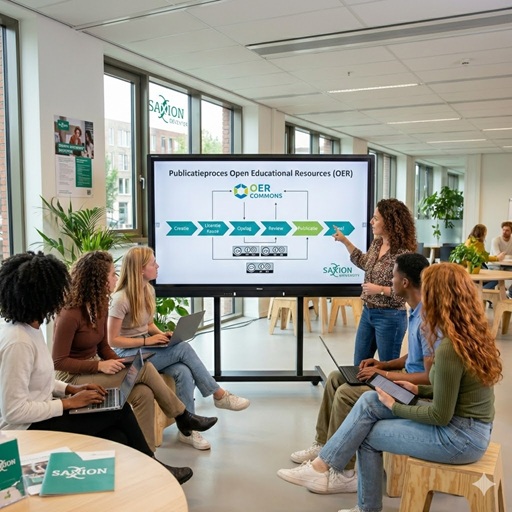
Does it take you more time to find useful learning materials than to create something yourself? Are your Google searches yielding no results? Found something, but now what?
Reusing means using existing digital (open) learning materials in your own teaching. Think of videos, textbooks, manuals, or complete lessons that are freely available under an open license (such as Creative Commons).
Besides the often-heard argument that it is the social role of publicly funded educational institutions to share and disseminate knowledge, open education is interesting for lecturers and students for several reasons.
For lecturers, open educational resources can be an efficient way to (re)develop education. Since open educational resources are freely available and usable, materials from others can be incorporated into your own teaching, eliminating the need to develop new materials yourself. Furthermore, open educational resources offer didactic advantages. Since open educational resources can be edited and mixed, you can adapt them to the local context, add current case studies, or, for example, choose to incorporate only a single chapter into existing courses.
For students, open educational resources can contribute to academic performance by addressing deficiencies or providing additional depth. Open education can also lead to cost savings for students. While commercial books are currently used for many basic subjects, it is worthwhile to explore the possibilities of open textbooks.
- Get inspired by the experiences of others. You can find various practical examples on edusources.
- Saxion lecturers have developed their own learning materials or MOOCs, including the toolboxes below.
- At media.saxion.nl, under Academies & Services, you’ll find various (public) videos developed by lecturers and staff.
- On the Media Xpert Centre channel, you’ll find all the productions developed by Saxion’s media team.
- There is a lot of information about and examples of open educational resources in the catalog of Saxion Library.
REUSING – frequently asked questions
Open educational resources are explicitly released with an open license (e.g., a Creative Commons license): this means you can use, modify, and share them within the license terms. Freely available materials online are not necessarily open: if no license is specified, it’s for personal use only. This means you can’t share it with others.
An open license (usually a variant of Creative Commons, such as CC-BY or CC-BY-SA) must be explicitly stated. If there is no license or rights information, reuse or adaptation is only permitted with the creator’s permission.
Reusing open educational resources offers several advantages. For teachers, it saves time by not having to develop everything themselves, and it allows you to gain inspiration by reviewing existing materials and adapting them to your own teaching context. You can also combine or remix materials to better align with your students’ learning objectives and level.
For students, using open educational resources provides up-to-date, accessible, and often interactive resources, allowing them to practice independently, deepen their knowledge, and apply their knowledge. This diversity and flexibility also encourages active and self-directed learning, which increases students’ engagement in the learning process and helps them achieve learning objectives more effectively.
In three steps we explain how to search for and find, assess and reuse open learning resources.
- Search & Find – Use the Saxion Library catalog, reliable search engines and repositories (e.g., edusources, OER Commons or OASIS), or consult Saxion’s collections.
- Evaluate – Check whether the material’s content and teaching methods align with your learning objectives and target audience, and check the license to ensure you know what you’re allowed to do with the learning material.
- Reuse – When using or adapting material, always ensure you include correct citation (author, title, date, link) and observe licensing terms, especially when combining material from multiple sources.
You can find open educational resources through platforms and search engines. The most important ones for the Netherlands are:
- Edusources — a national platform for (semi-)open digital learning resources, where educational institutions can share and link their materials.
- Wikiwijs — also widely used in secondary education.
- Outside the Netherlands, you can use international repositories, such as OER Commons or OASIS.
- Saxion Library — Saxion has its own collections and lists by discipline (e.g., economics, communication). These can be used for inspiration.
- Saxion Media Platform — Saxion has its own platform where videos and podcasts are published. These are created by lecturers as well as by the Media Xpert Centre.
The search engines offer filter options and keyword searches. Assess the material’s usability yourself by considering aspects such as format, objectives, structure, source code, license, and so on.
Always check the accompanying license. If the material is under an open license (such as a Creative Commons license), it will specify what you are allowed to do with it (use, edit, share). If no license is specified, you may not use it without permission. Also, check whether the material is semi-open (available only within an institution) or fully open for external use.
Read more on the page Copyright.
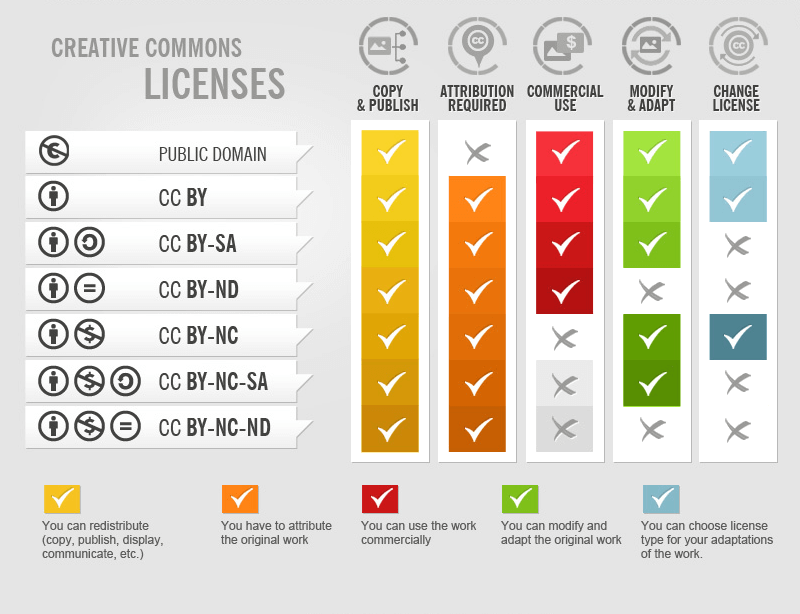
Creative Commons (CC) has six main variants plus the Public Domain Mark. The variants combine these conditions:
- BY (Attribute) – You must credit the creator.
- NC (Non-Commercial) – For non-commercial use only.
- ND (No Derivatives) – You may not modify the material.
- SA (Share Alike) – Derivative works must be shared under the same license.
For example: CC BY is very liberal; CC BY-NC-SA means you can edit, but not use commercially, and the edited version must be released under the same license.
The Public Domain Mark (PD) means the work is in the public domain and free of copyright. For an overview, you can visit Creative Commons Nederland.
If no license is mentioned on the website, this automatically means All rights reserved and you must therefore first ask the author for permission.
If the license allows it (see question: How do I know if I can use learning materials in my own teaching?), you can make adjustments to make the material suitable for your course. You can also republish the adjusted learning materials (depending on the license).
When reusing material, you must include at least the following information: author, title, publication year (or date of access), license, and a hyperlink to the original.
For example: “Author, Title, Year, CC BY 4.0, available at [link]”
If you’ve edited material, you can indicate “edited in response to…” or “edited by…” and what changes you made.
For example:
This text is a derivative of Stappenplan Zelf leermateriaal ontwikkelen en open delen offered by SURF with a CC BY 4.0 license.
Yes, that’s possible, provided you meet the requirements of the open licenses. Some things to keep in mind:
- You may only integrate the open source material under the terms of the license (e.g., editing, sharing).
- Be careful not to violate any licenses. For example, you cannot permit commercial use if a source is CC BY-NC (NC = Non-Commercial).
- Your own material remains under your copyright, even if you publish it with an open license. Users simply do not need to request permission to reuse it.
- If you create a composite publication (with material from multiple sources), you should check for conflicting licenses. You can adopt the source license for each component and thus license each component individually.
- If you want to apply a single license to your composite work, you must compare all the licenses and investigate the possibilities. For example, if one source stipulates that the material may not be used commercially, then your composite product may not be used commercially either.
- Consult with the copyright specialist at Saxion Library to determine which license your work should receive.
Specific considerations apply to media files:
- Check the license of the image/or video separately – an open educational resource may contain media files that may not be further shared openly.
- Check if a media file is licensed under a CC license that allows editing.
- If there is no license, you must request permission or use images from open sources (e.g., Wikimedia Commons, Unsplash, or Pixabay).
- Add proper attribution (creator, license, link) to the image or video.
For more information on what is and isn’t permitted, please visit Saxion Library’s Copyright page.
The SHB Libraries and Open & Online Education working group has checklists for the use of video, text, and images.
You can assess materials based on various criteria, for example:
- Content: Check whether the information is factually correct, current, and relevant.
- Didactic usability: Does it align with your learning objectives? Does it contain instructions, explanations, or exercises that are relevant to your teaching?
- Technical quality & accessibility: Does everything work properly (text, images, videos, links)? Is the layout clear, and is the material usable for all students?
- License and rights: Is the license explicitly stated and does it clearly state what you are allowed to do (reuse, edit, share)?
- Usability: How easy is the material to integrate into your educational context?
In addition, based on your experience, you can assess whether the material feels suitable for your students and teaching style: is it understandable, relevant and workable within your course context.
You can use digital learning materials in your teaching in various ways, depending on what you want to achieve:
- Before class: Have students study material in advance (such as a video or article) so that you can delve deeper, apply, or discuss it during contact time. This aligns with a blended approach.
- During or after class: Use digital resources for supplementation, deepening, or review. Students can practice independently, watch additional explanations, or use materials for assignments.
- As part of active learning activities: Have students do something with the material: analyze a case, complete an assignment, collaboratively design solutions, or reflect on concepts. This increases engagement and encourages deep learning.
- Use open educational resources for exploration or differentiation: You can choose modules or components that suit different student levels or varying learning objectives. Remixing, adapting, or combining materials is permitted with open licenses.
This approach gives students flexibility, encourages active and independent learning, and leverages the power of digital and open sources in your education.
There are a number of practical tips for sharing open learning resources in the Brightspace environment:
- Where possible, import or embed materials (e.g., PDFs, videos, external modules) via links or embed code to avoid creating duplicates.
- Include the teaching method, instructions, and context so students know how to work with the material. Guide students in using it. Ensure it is always clear why they need to view/read/listen to certain material.
- Ensure that the license, source reference, and usage instructions are visible.
- Test that all links/embedded content work within Brightspace, including on mobile devices.
Yes, as long as the license allows it. Many open licenses allow distribution in copy form as long as you still mention the license and don’t exceed any restrictions. If the license has a restriction (such as online use only, or no editing), you must respect that. For unlicensed materials, you must first ask permission or check if they are covered by the Easy Access scheme.
Yes, provided the license allows editing and translation (e.g. CC BY, CC BY-SA):
- Check whether the original creator has given permission for editing or translating.
- When translating, you must indicate that you have translated (attribute the source).
- Respect license terms such as Share Alike (SA). You must share your translation under the same license.
If the license contains ND (No Derivatives), you may not make a translation.